

Voolist for WooCommerce
Sell Your WooCommerce Catalog on Marketplaces Without Another Plugin
Put the products you already have on eBay, Etsy, Poshmark, and Depop, with nothing installed on your WordPress site and nothing new to break.
14-day money-back guarantee
Loved by 2900+ resellers
Sound familiar?
The Parts of WooCommerce Plus Marketplaces That Go Wrong
If you’ve said any of these out loud this month, keep reading.
I’m not adding another plugin to a site that already has thirty.
You aren’t. Voolist runs in the cloud and talks to your store from outside it. Nothing to install, nothing to update, nothing to conflict with your theme.
The eBay plugin and the Etsy plugin are two separate subscriptions.
One plan here, every channel included. Your bill doesn’t go up because you added a marketplace.
My sync runs on WP-Cron and only fires when somebody visits the site.
Voolist doesn’t depend on your server or your traffic. Stock updates in seconds whether anyone is on your site or not.
None of the WordPress plugins go anywhere near Poshmark.
That’s the gap we fill. Poshmark and Depop alongside eBay and Etsy, which matters if you sell apparel or anything secondhand.
I oversold because my store didn’t know it had gone on eBay.
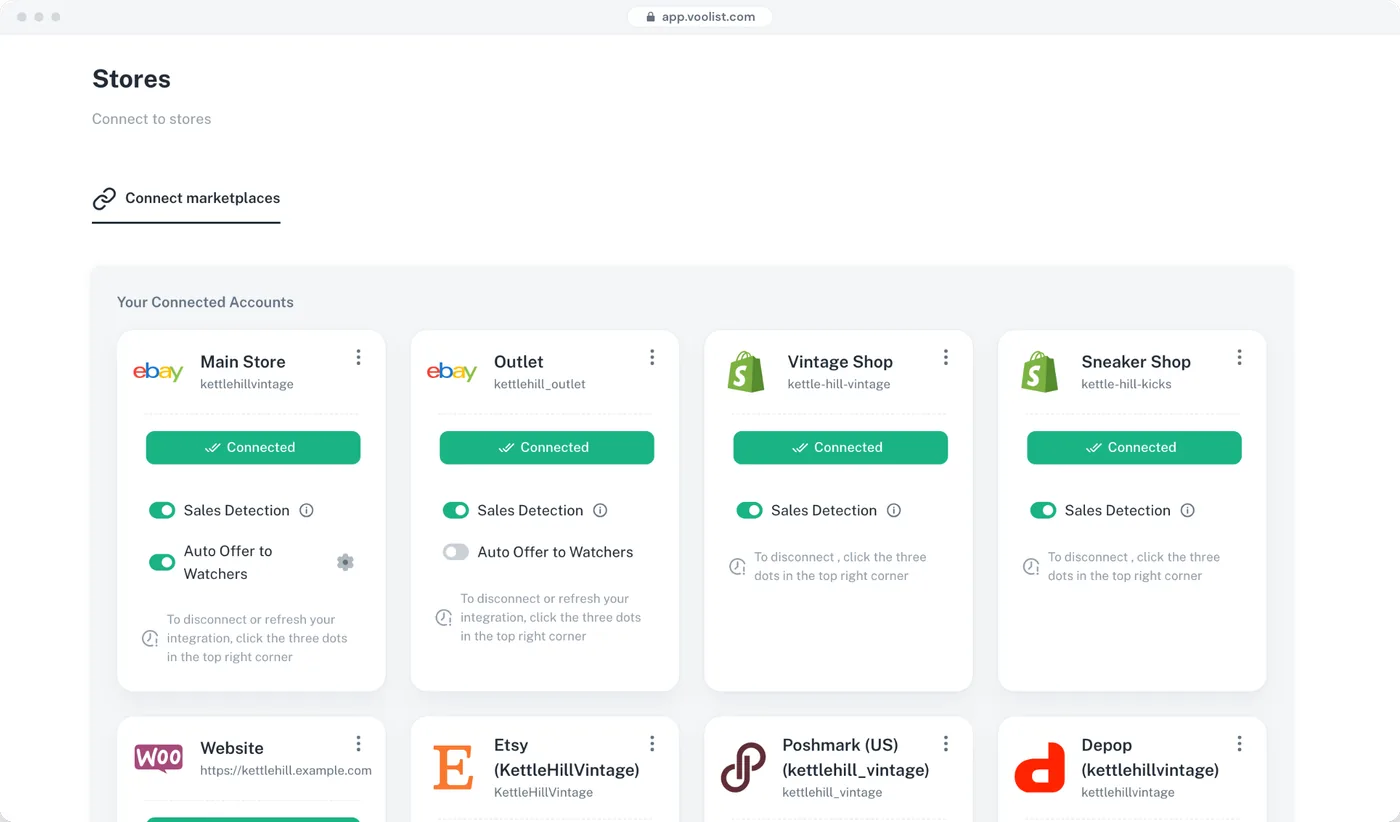
When something sells anywhere, stock updates in WooCommerce and on every other channel in seconds.
I can’t charge marketplace prices and store prices at the same time.
You can. Set a different price, title, and description per channel and protect the margin on your own store.
I’ve got 400 products and no intention of listing them one at a time.
Import the catalog in one go, filter to what you want listed, and push it in bulk.
I want the new range live everywhere on the same morning.
Build it ahead, set the date and time, and Voolist publishes it across every channel for you.
I run three WooCommerce sites and three sets of logins.
Connect them all and switch between them from one Voolist login.
Will this touch my theme or my checkout?
No. Voolist reads and writes products through your store’s connection. Your theme, your pages, your plugins, and your checkout are untouched.
Keep WordPress Lean. Put the Catalog Where the Buyers Are.
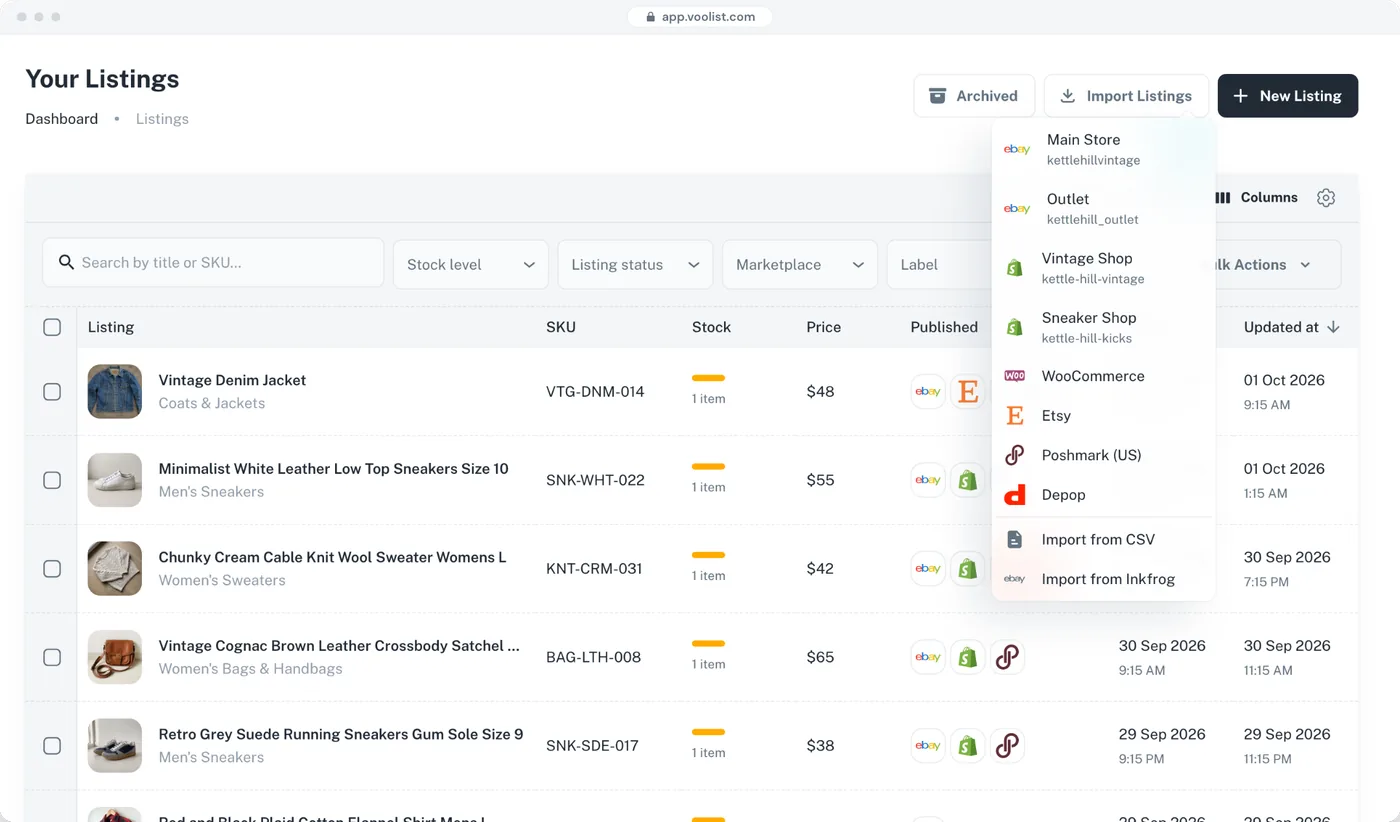
Voolist takes the products sitting in WooCommerce and lists them on six more storefronts, each with its own price and wording, while stock stays in step in both directions. All of it runs in the cloud, so your WordPress install stays exactly as light as it is right now.
One Catalog, Six Marketplaces, Nothing Installed
Your WooCommerce product already has a title, a description, images, and a category. Voolist reads all of it and fills in what each marketplace asks for on top. It happens from the cloud, so there’s no plugin sitting in your install waiting to break on the next WordPress update.
- Products, images, and categories imported in one go
- Marketplace-specific fields filled in for each destination
- Categories mapped to the right category on each channel
- No plugin, no files uploaded, no changes to your theme
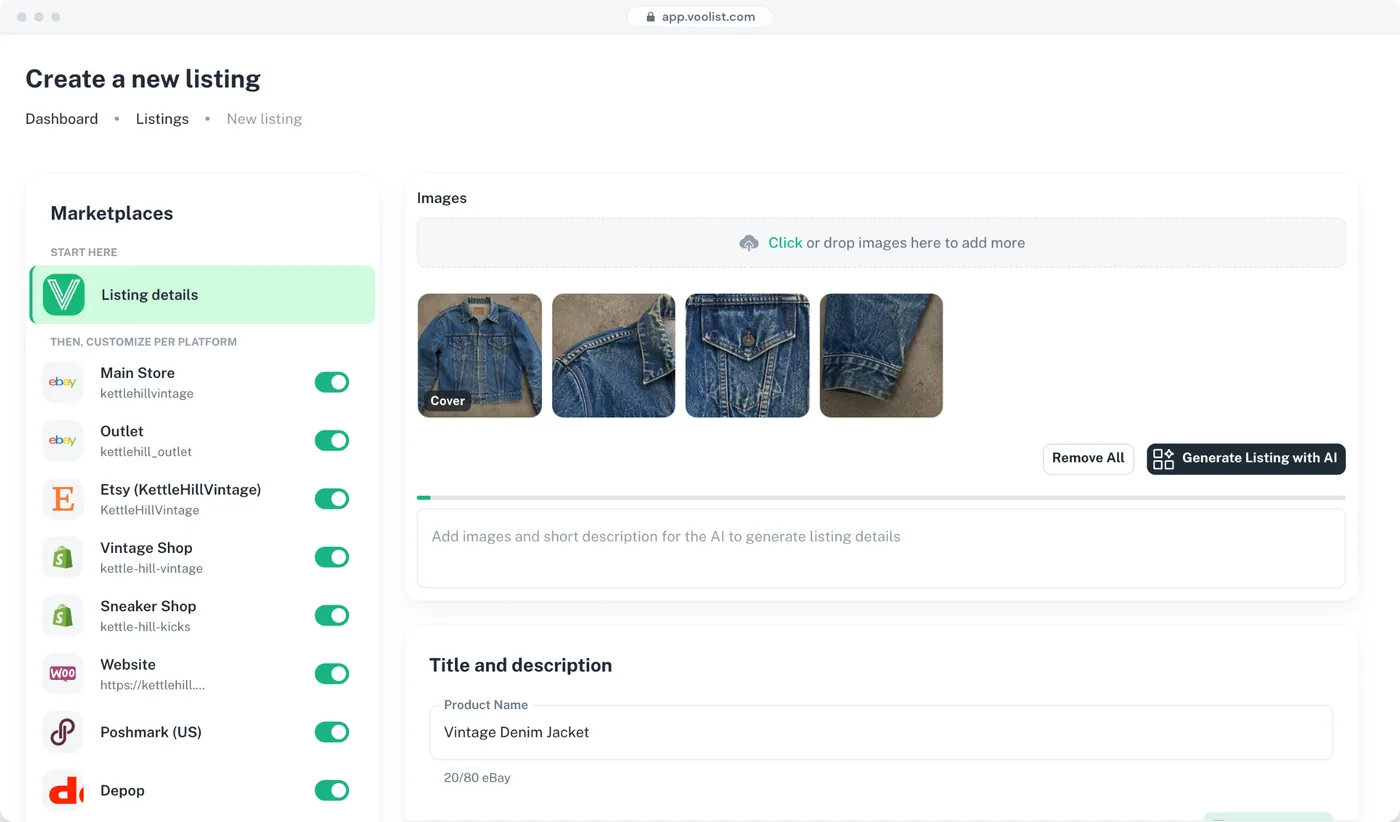
Poshmark and Depop, Which No WordPress Plugin Reaches
If you sell apparel, vintage, or anything secondhand, Poshmark and Depop are where those buyers actually are, and this is how your WooCommerce catalog gets there.
- Poshmark and Depop alongside eBay and Etsy
- Sizes, brands, and hashtags handled per platform
- The same stock, so a store sale removes it from the marketplaces too
- Voolist doesn’t connect to Amazon or Walmart, and says so
The marketplace plugins for WooCommerce go to eBay, Amazon, and sometimes Etsy. None of them reach resale.
Stock Stays in Step, and It Doesn’t Need Your Server
Voolist runs in the cloud on its own schedule. A sale anywhere updates everywhere in seconds, traffic or no traffic.
- Sales detected and stock updated in seconds
- Works both ways between WooCommerce and every marketplace
- Doesn’t depend on WP-Cron or on your site getting visitors
- Sales detection and auto-delist are on every plan
Plugin-based sync usually rides on WP-Cron, which only fires when somebody loads your site. A quiet Tuesday can mean stock that’s hours out of date.

Voolist
Live on 0/7

Vintage Denim Jacket
SKU · VTG-DNM-014
$48

eBay

Poshmark

Depop

Etsy

Shopify

BigCommerce
WooCommerce
Publishing to all your platforms…
Charge What Each Channel Is Worth
Marketplace commission isn’t your store’s cost base, so the same number shouldn’t appear everywhere. Price up where you pay a fee, hold your margin on your own site, and give each channel its own title and description while you’re at it.
- Set a price per platform, not one price everywhere
- Different title and description per channel too
- Change a price once and push it to the channels you choose
- Bulk price rules across hundreds of products at once
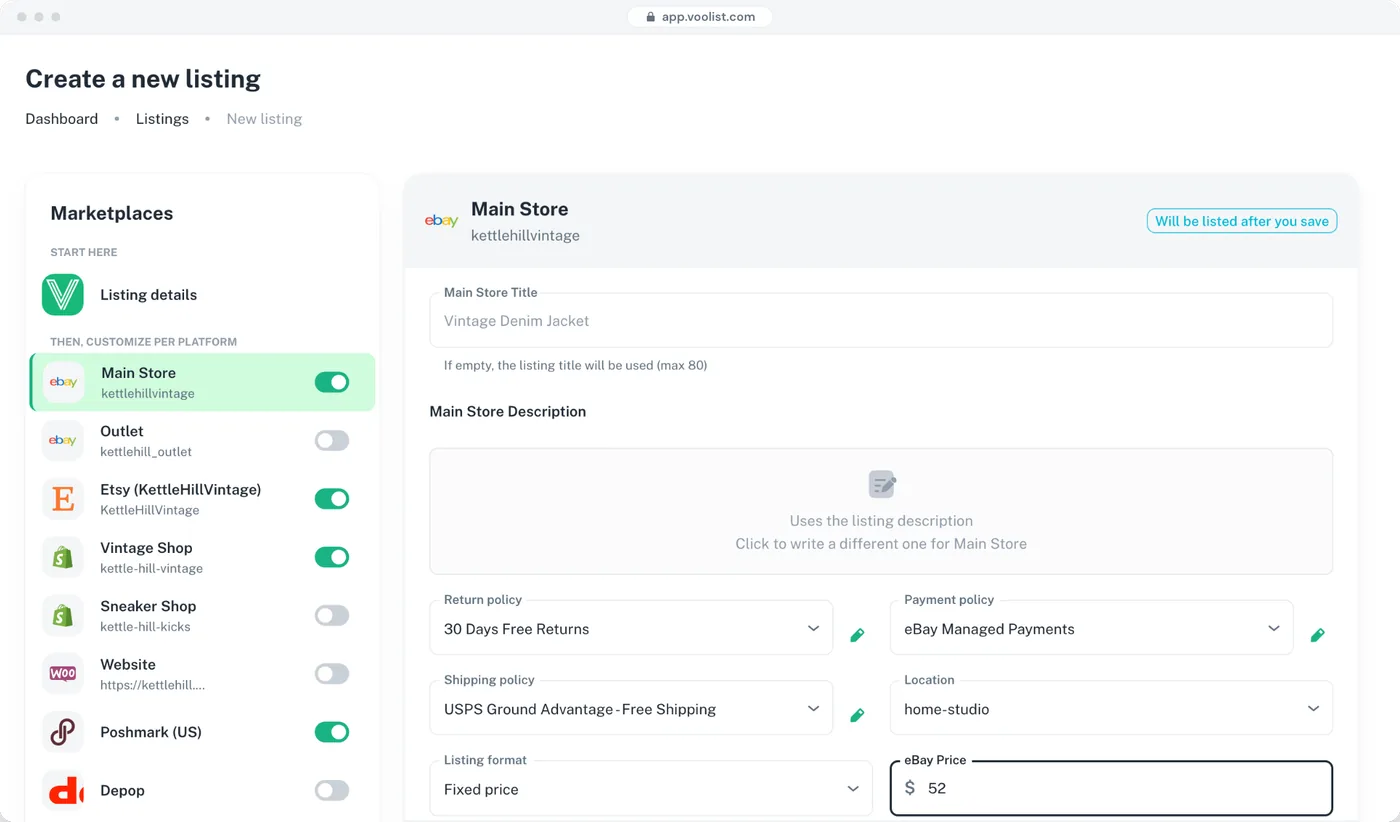
List 400 Products With WordPress Sitting It Out
Filter to the products you want on a given channel, set the change once, and let it run. The work happens on our servers, so your site never feels it. Prices, titles, descriptions, categories, whatever needs to move.
- Bulk create, bulk edit, bulk delist and relist
- Filter by category, status, tag, SKU, platform, or date
- Watch each product complete instead of guessing
- Bulk cross-listing on every plan
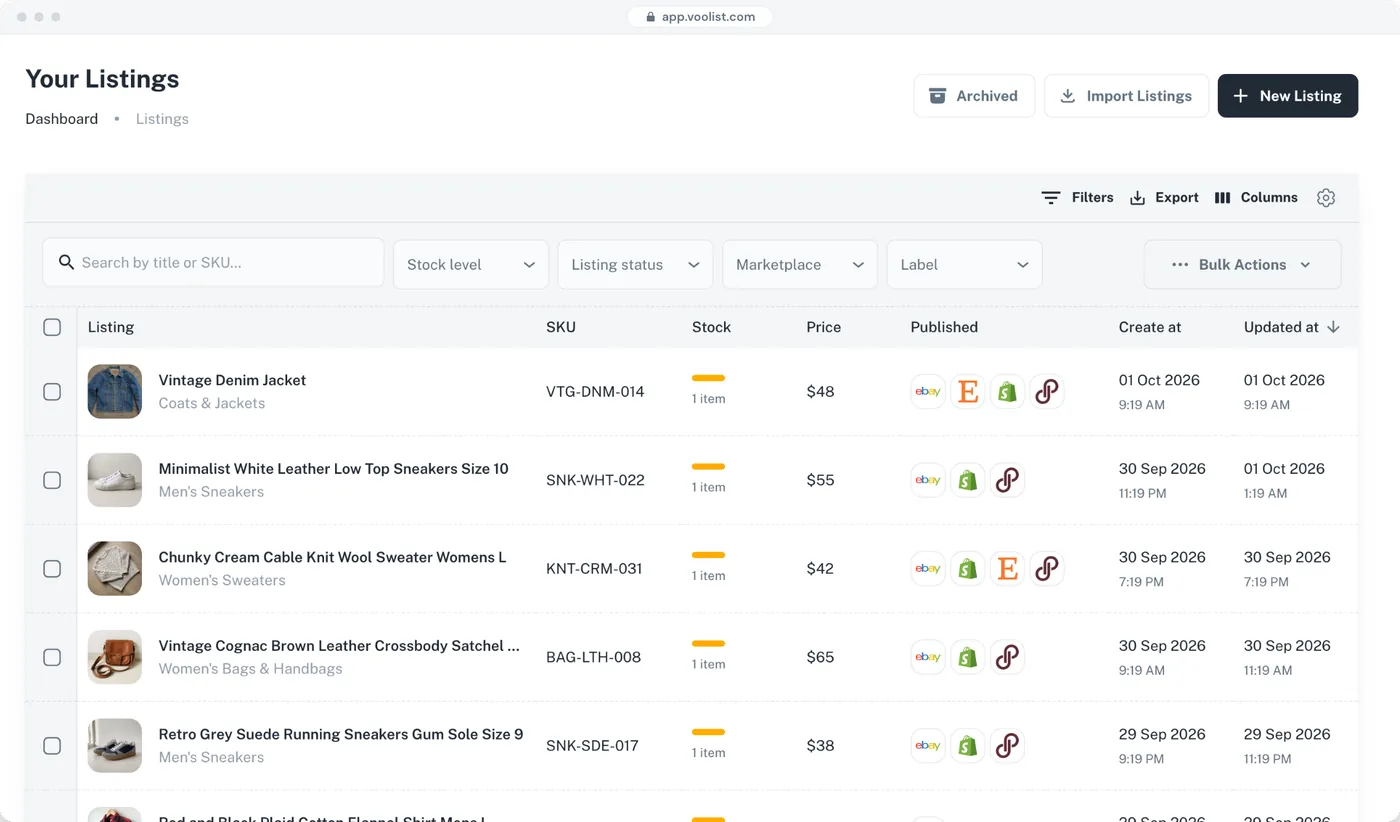
One Description for Your Site, Another for eBay
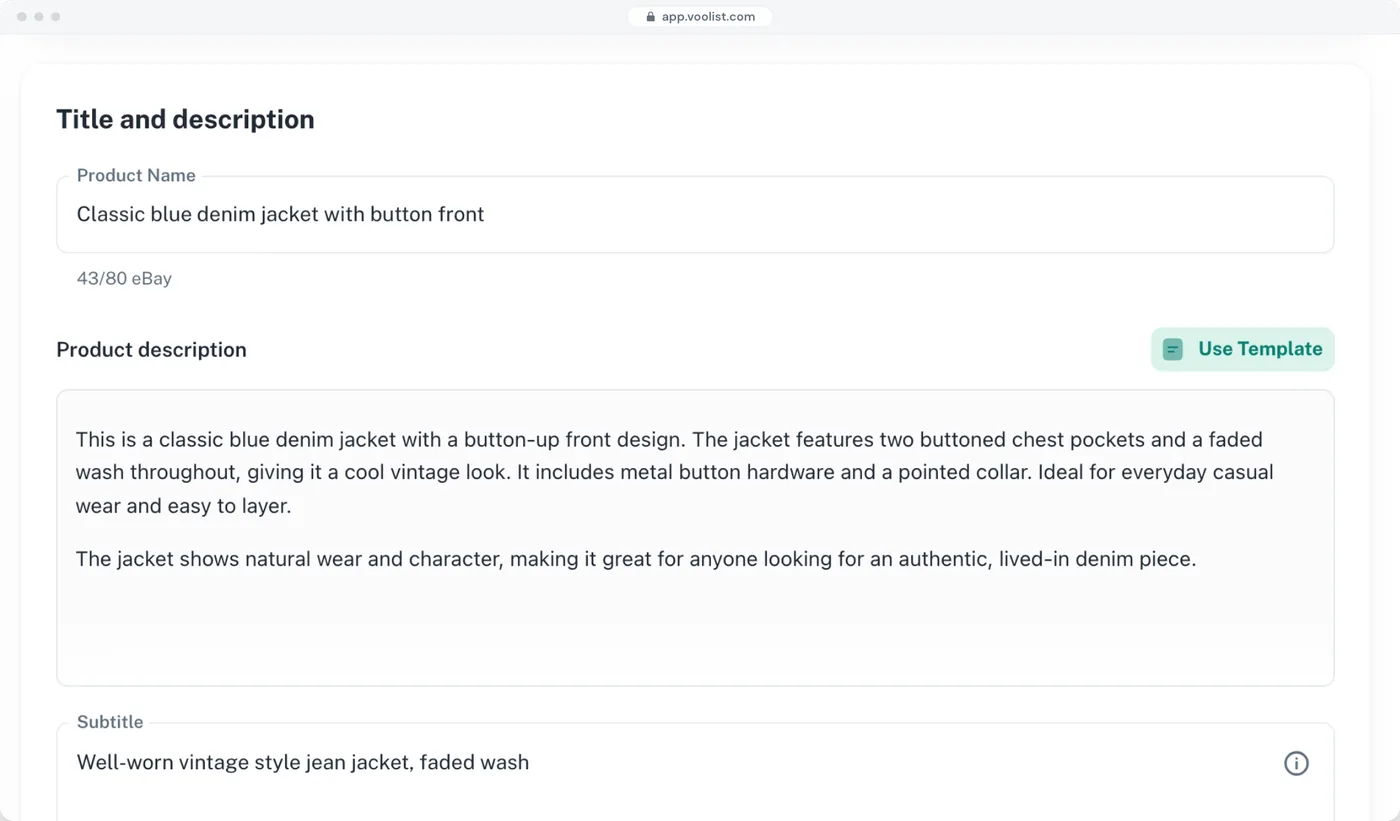
The description that works on your own site is rarely the one that works on eBay. Build the marketplace version as a template, apply it to anything, and edit photos in the same place instead of round-tripping through the media library.
- Unlimited reusable templates on every plan
- Crop, resize, rotate, filter, watermark, and annotate photos
- Free unlimited photo hosting, which keeps weight off your server
- Turn any product into a template for the next one
Launch a Range Everywhere at the Same Moment
Build the whole thing ahead of time, pick the date and time, and Voolist publishes it across every connected channel when it comes around.
- Pick a date and time and Voolist publishes for you
- The same schedule across every connected channel
- Smart defaults that remember your recent categories and settings
- Schedule the delist too, for a sale that ends on time
No scheduled post plugin and no staying up to hit publish on six tabs.
Run Two or Three WooCommerce Sites From One Login
Plenty of WordPress people end up with more than one store: a main site, a clearance site, a second brand. Connect them all to Voolist and move between them without three sets of admin logins.
- Connect and run more than one WooCommerce store from a single dashboard
- One store on Starter, two on Pro, three on Power 5K
- Move a product between your own stores without rebuilding it
- Works the same way for your marketplaces
Your Site Owns the Customer. Marketplaces Bring the Traffic.
WooCommerce is where you own everything: the data, the customer, the margin, the design. Marketplaces are where people are already searching. Running both is the point, and the admin is the only reason people don’t. That’s the part Voolist takes.
- One product publishes to all seven platforms
- Per-platform price, title, and description
- Stock correct across all of them, in seconds
- Your site stays the home base and keeps the customer
Getting set up
Connected to WooCommerce in About a Minute
- Create your accountSign up at Voolist. No card details needed to look around the app.
- Connect your storeOpen "My stores", enter your store URL, and authorize the connection. No plugin to download and no files to upload.
- Import your catalogVoolist pulls in your products, images, and categories. Importing is read-only, so your storefront is untouched.
Plus the Small Things You Touch Every Day
None of these are add-ons you pay extra for. Where something needs a particular plan, it says so.
One-click catalog import
Pull products, images, and categories in. Read-only, so your storefront is untouched.
Import by CSV
Upload inventory from a spreadsheet instead of typing it in.
Smart duplicate detection
Importing from a marketplace too? Voolist spots the repeats and lets you merge them.
Clone any product
Turn an existing product into the starting point for the next one.
Different details per platform
One product, with its own price, title, and description on each channel.
Smart defaults that learn
Voolist remembers your recent categories and preferences and fills them in.
Search and filter your inventory
Find anything by SKU, tag, or keyword. Filter by category, platform, status, or date.
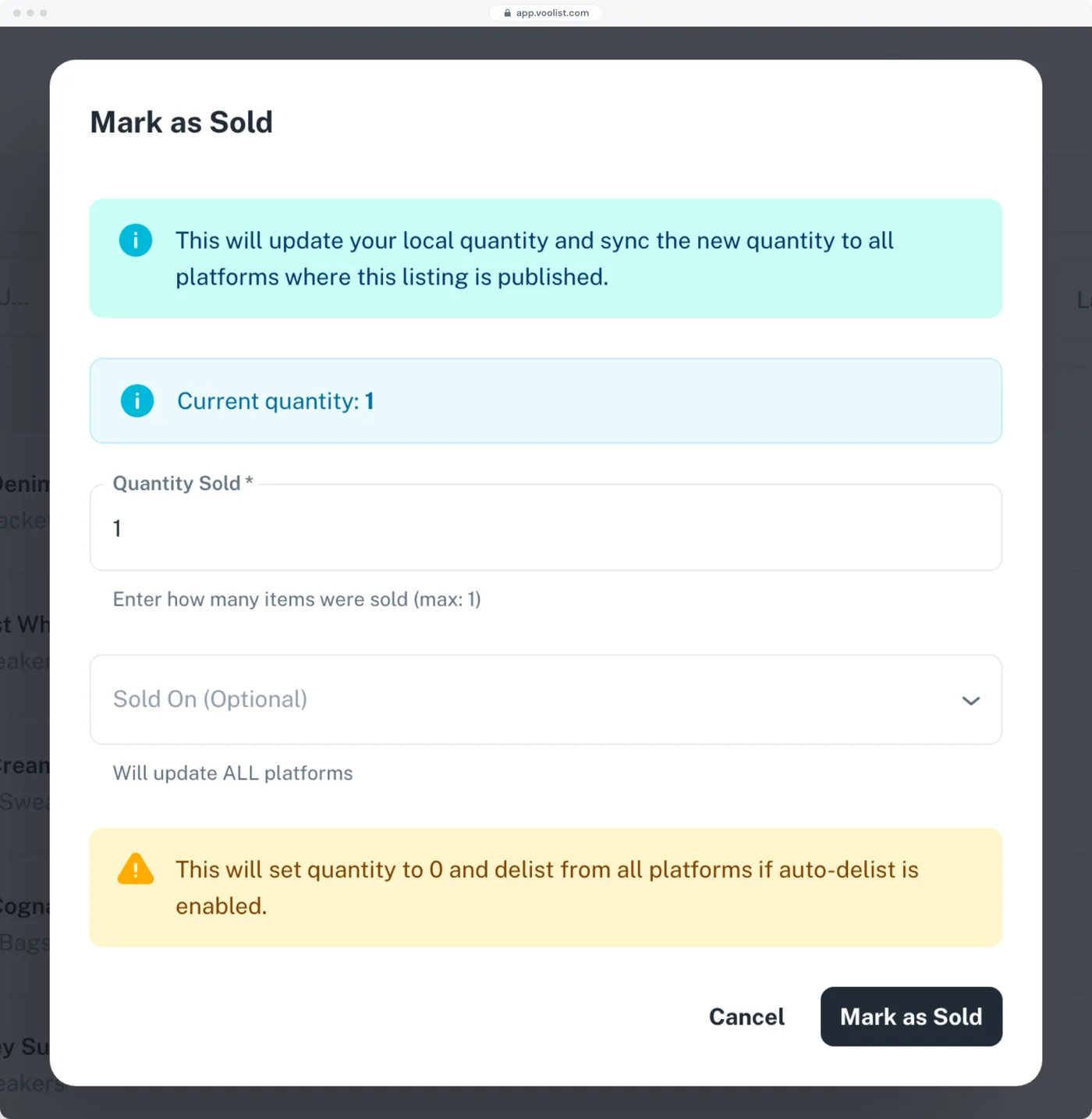
Mark as sold anywhere
Sold off-platform? Mark it once and your stock updates everywhere else.
Tags and labels
Organize your inventory the way you actually think about it.
Free photo hosting
We host your product photos, which keeps the weight off your own hosting.
Your shop settings
Set your currency, units, and defaults once and stop thinking about them.
Live chat support
A real person to talk to, on every plan.
How it compares
WooCommerce Alone, Marketplace Plugins, and Voolist
The WordPress plugins live inside your install and usually charge per marketplace. Voolist runs outside it on one plan. Both approaches work, and they fail in different places.
| Feature | Every feature, every planVoolist | WooCommerce alone | WordPress plugins |
|---|---|---|---|
| Poshmark and Depop | Yes | No | No |
| eBay and Etsy | Yes | No | Limited |
| Nothing installed on your WordPress site | Yes | Yes | No |
| Sync that doesn’t depend on WP-Cron | Yes | No | Limited |
| One plan for every marketplace | Yes | Yes | No |
| A different selling price per channel | Yes | No | Limited |
| Reusable listing templates | Yes | No | Limited |
| Photo editing built in | Yes | Limited | No |
| Two or three stores from one login | Yes | No | No |
| Amazon and Walmart | No | No | Yes |
| Marketplace orders imported into WooCommerce | No | No | Yes |
| Get Started Now |
- Yes
- Limited
- No
Voolist doesn’t connect to Amazon or Walmart and doesn’t pull marketplace orders back into WooCommerce. If either is essential, a plugin is the right tool for you, not this one. This describes an approach rather than any one product.
From sellers using it
What Sellers Say About Voolist
I looooooooove how user-friendly it is. Other cross-listing platforms look like they're made with 1990 html-like design, but Voolist looks minimalist, modern, and easy to use. No clutter or mess. Just straight to the point. You create a listing, you cross-list it, and monitor it.
Full-Time Reseller
Voolist has honestly saved me so much time every week. What used to take hours now just takes a few clicks. The support team is also incredible, every time I've had a question, they've responded quickly and really made me feel valued.
Full-Time Reseller
Voolist is a godsend, thank you. I'm not just saying this, but Voolist has provided me a much needed tool that is very costly most places.
Full-Time Reseller
Voolist helped me increase sales. I was selling only on my Shopify store before, but once I started listing my products on eBay and other platforms, I saw more orders coming in. It is very simple to use and made a huge difference for my business.
Small Business Owner
I spent roughly 5 minutes on Voolist and what a piece of cake! I'm so far thrilled. I cannot begin to tell you how much I love it.
Reseller
I do like how simple it is to build listings here, and how easy everything looks, and I'm impressed with the communication. You folks have built a wonderful product.
Full-Time eBay Seller
I looooooooove how user-friendly it is. Other cross-listing platforms look like they're made with 1990 html-like design, but Voolist looks minimalist, modern, and easy to use. No clutter or mess. Just straight to the point. You create a listing, you cross-list it, and monitor it.
Full-Time Reseller
Voolist has honestly saved me so much time every week. What used to take hours now just takes a few clicks. The support team is also incredible, every time I've had a question, they've responded quickly and really made me feel valued.
Full-Time Reseller
Voolist is a godsend, thank you. I'm not just saying this, but Voolist has provided me a much needed tool that is very costly most places.
Full-Time Reseller
Voolist helped me increase sales. I was selling only on my Shopify store before, but once I started listing my products on eBay and other platforms, I saw more orders coming in. It is very simple to use and made a huge difference for my business.
Small Business Owner
I spent roughly 5 minutes on Voolist and what a piece of cake! I'm so far thrilled. I cannot begin to tell you how much I love it.
Reseller
I do like how simple it is to build listings here, and how easy everything looks, and I'm impressed with the communication. You folks have built a wonderful product.
Full-Time eBay Seller
I looooooooove how user-friendly it is. Other cross-listing platforms look like they're made with 1990 html-like design, but Voolist looks minimalist, modern, and easy to use. No clutter or mess. Just straight to the point. You create a listing, you cross-list it, and monitor it.
Full-Time Reseller
Voolist has honestly saved me so much time every week. What used to take hours now just takes a few clicks. The support team is also incredible, every time I've had a question, they've responded quickly and really made me feel valued.
Full-Time Reseller
Voolist is a godsend, thank you. I'm not just saying this, but Voolist has provided me a much needed tool that is very costly most places.
Full-Time Reseller
Voolist helped me increase sales. I was selling only on my Shopify store before, but once I started listing my products on eBay and other platforms, I saw more orders coming in. It is very simple to use and made a huge difference for my business.
Small Business Owner
I spent roughly 5 minutes on Voolist and what a piece of cake! I'm so far thrilled. I cannot begin to tell you how much I love it.
Reseller
I do like how simple it is to build listings here, and how easy everything looks, and I'm impressed with the communication. You folks have built a wonderful product.
Full-Time eBay Seller
I looooooooove how user-friendly it is. Other cross-listing platforms look like they're made with 1990 html-like design, but Voolist looks minimalist, modern, and easy to use. No clutter or mess. Just straight to the point. You create a listing, you cross-list it, and monitor it.
Full-Time Reseller
Voolist has honestly saved me so much time every week. What used to take hours now just takes a few clicks. The support team is also incredible, every time I've had a question, they've responded quickly and really made me feel valued.
Full-Time Reseller
Voolist is a godsend, thank you. I'm not just saying this, but Voolist has provided me a much needed tool that is very costly most places.
Full-Time Reseller
Voolist helped me increase sales. I was selling only on my Shopify store before, but once I started listing my products on eBay and other platforms, I saw more orders coming in. It is very simple to use and made a huge difference for my business.
Small Business Owner
I spent roughly 5 minutes on Voolist and what a piece of cake! I'm so far thrilled. I cannot begin to tell you how much I love it.
Reseller
I do like how simple it is to build listings here, and how easy everything looks, and I'm impressed with the communication. You folks have built a wonderful product.
Full-Time eBay Seller
Starter
The essentials to sell on every platform
Billed monthly
14-day money-back guarantee
1,000
25
1
Every feature, including:
Cross-list to 7 platforms from one form
Sales detection and auto-delist
Bulk cross-listing
One-click import or CSV upload
AI listing writer
Bulk edit, delist and relist
Live chat support
Pro
For growing sellers who need speed and automation
Billed monthly
14-day money-back guarantee
5,000
250
2
Everything in Starter, plus:
Two eBay accounts or two Shopify stores
3x the active listings
5x the drafts
10x the AI listings
Power
For high-volume sellers and agencies managing large catalogs
Billed monthly
14-day money-back guarantee
10,000
500
2
Everything in Pro, plus:
Priority sync
Priority support
Room for 2,000 to 10,000+ listings
Up to 1,000 AI listings a month
Try Voolist for 14 days
Not happy? Get a full refund, no questions asked.
Secure checkout
Cancel your plan anytime.
What WooCommerce Sellers Ask
No. Voolist runs in the cloud and connects to your store from outside it. There’s nothing to download, nothing to upload, and nothing new in your plugins list that can conflict with your theme or break on a WordPress update.
eBay, Etsy, Poshmark, Depop, Shopify, and BigCommerce. Voolist doesn’t connect to Amazon, Walmart, or TikTok Shop. If those are the channels you need, a plugin or one of the big connectors is a better fit. Better you know now than three weeks in.
Open "My stores" in Voolist, enter your store URL, and authorize the connection. It takes under a minute and there’s no plugin involved.
No. Voolist reads and writes products through your store’s connection, not your storefront. Your theme, pages, plugins, and checkout are untouched, and importing is read-only.
No, and this is worth knowing. Plugin-based sync often rides on WP-Cron, which only runs when someone visits your site, so a quiet day means stale stock. Voolist runs on its own schedule in the cloud. A sale anywhere updates everywhere in seconds regardless of your traffic.
No. Voolist syncs products and stock, not orders. Marketplace orders stay in that marketplace, and your WooCommerce orders stay in WooCommerce. Some plugins do import orders, so if that’s central to how you work, one of those is the better tool.
Yes, and you probably should. Marketplace commission isn’t your store’s cost base. Set a price per platform, and a different title and description too, so your own site keeps the better margin.
Yes. You schedule it in Voolist: pick the date and time, and Voolist publishes to each connected channel when that moment arrives. Useful for a range launch or a sale you want live everywhere at 9am.
Yes. You can connect more than one store and switch between them from a single Voolist login. How many depends on your plan: one on Starter, two on Pro, and three on Power 5K.
No. It’s one flat monthly plan covering every channel, from $19.99 on Starter up to $79.99 on Power 5K, with two months free if you pay yearly. Adding a marketplace doesn’t add a subscription.
There’s no free trial, but every plan comes with a 14-day money-back guarantee. Try the full product and if it’s not for you within 14 days, you get a full refund. You can cancel anytime.
If you sell from the USA, Canada, the UK, Australia, or anywhere in the EU, yes.
Still have questions?
Drop us an email at hello@voolist.com
Store plus marketplaces
New to Selling in More Than One Place?
Short answers here, and the full guide behind each one. Worth reading before you connect your first marketplace.
Why run a store and marketplaces together
Your site owns the customer and the margin. Marketplaces own the traffic. Sellers who do both use the site for repeat buyers and the marketplaces for discovery.
How cross-listing worksThe overselling problem
The moment the same stock sits on two storefronts, one sale can create a cancellation on the other. Stock sync is what makes running both possible at all.
Inventory syncWooCommerce or Shopify for resellers
Self-hosted and flexible against hosted and simple. The right answer depends on how much of your time you want going into the store itself rather than the selling.
WooCommerce vs Shopify for resellersPricing for marketplaces and your own site
Commission, payment processing, and shipping all land differently per channel. One price everywhere means you’re either leaving money on your site or losing it on a marketplace.
Fee calculatorGetting your catalog in
Importing is the part people dread and it’s usually the quickest bit. Products, images, and categories come across, and nothing on your storefront changes.
Import listingsTools for running a WooCommerce store
Plugins, connectors, and bookkeeping all overlap, and every plugin is weight on your site. Knowing which jobs one tool genuinely covers keeps the install lean.
Best tools to manage your WooCommerce storeWhere Should Your Products Go?
Voolist connects to six more platforms. The same catalog works on all of them.
Put Your Catalog Where the Buyers Already Are
Connect WooCommerce, import what you already sell, and pick which marketplaces get it. No plugin, and a 14-day money-back guarantee on every plan.
Get Started Now14-day money-back guarantee