

Voolist for Whatnot
Whatnot Listing Tool That Keeps Your Shop Full
Put your listings in your Whatnot shop and on the Marketplace from the same form you use everywhere else, keep one stock count across every platform, and stop selling the same card twice.
14-day money-back guarantee
Loved by 2900+ resellers

Voolist
Live on 0/11

Vintage Denim Jacket
SKU · VTG-DNM-014
$48
Whatnot

eBay

Poshmark

Depop

Etsy

Grailed


5 more
Publishing to all your platforms…
One Place to List, Count, and Manage Everything in Your Whatnot Shop
Voolist looks after the work around your Whatnot shop: getting your listings in without retyping them, one stock count that stays right as things sell, bulk editing, and a sold item that comes off everywhere else.
Stock Your Whatnot Shop From Listings You Already Have
Your cards, sneakers and collectibles are probably listed somewhere already. Import them into Voolist, select the ones you want, choose Whatnot, and they go up in your Whatnot shop and on the Marketplace.
- Select your listings and publish them to Whatnot together
- Listings in your shop and on the Marketplace
- Category suggested and size filled in from your other listing
- Bulk cross-listing on every plan
One Stock Count for Whatnot and Everywhere Else
Sealed boxes, card lots and repeat stock don’t need a listing each. Set the quantity in Voolist and your Whatnot listing carries it. When some sell elsewhere, Voolist lowers the Whatnot count, and when the last one goes, it hides the listing.
- One Whatnot listing for many of the same item
- The Whatnot count comes down as they sell elsewhere
- Hidden on Whatnot when you’re out, not deleted
- Add stock in Voolist and save, and Whatnot gets the new number
Voolist never raises the count on Whatnot by itself. If the listing was hidden at 0, switch Whatnot back on and save to put it back on sale.
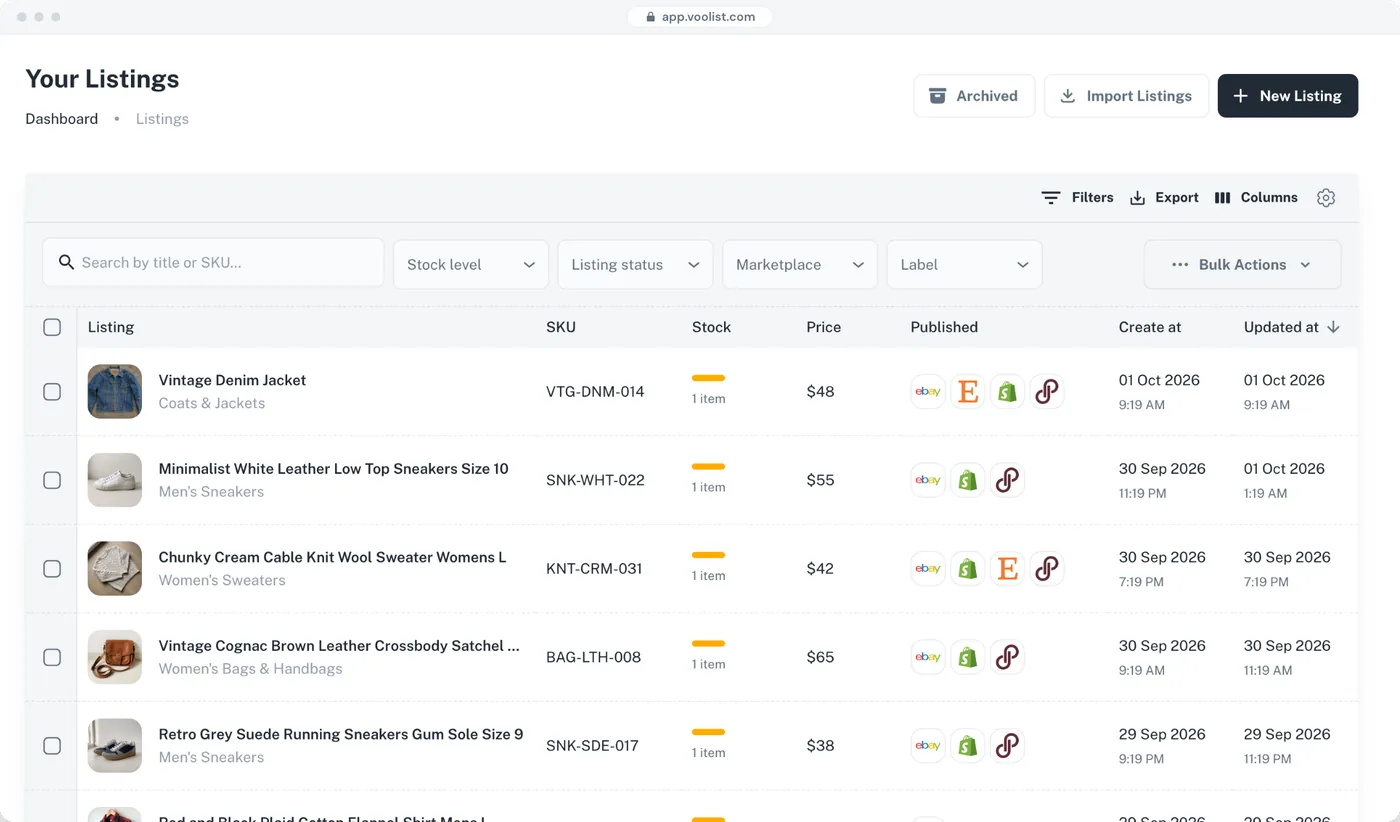
One Form for Whatnot and Ten More Platforms
Fill in the details once, switch Whatnot on, and the same listing goes to your Whatnot shop and anywhere else you pick, from eBay to your own Shopify store. The Whatnot section asks what Whatnot’s own form asks, and anything you leave empty uses what your listing already says.
- A Whatnot category suggested from your listing elsewhere
- Condition, brand and color shown in Whatnot’s own words
- A shipping profile picked for you by package weight
- SKU, cost and UPC sent to Whatnot with the listing
- Accept offers on, and a live price you can raise or lower
It Sells on Whatnot, It Comes Down Everywhere Else
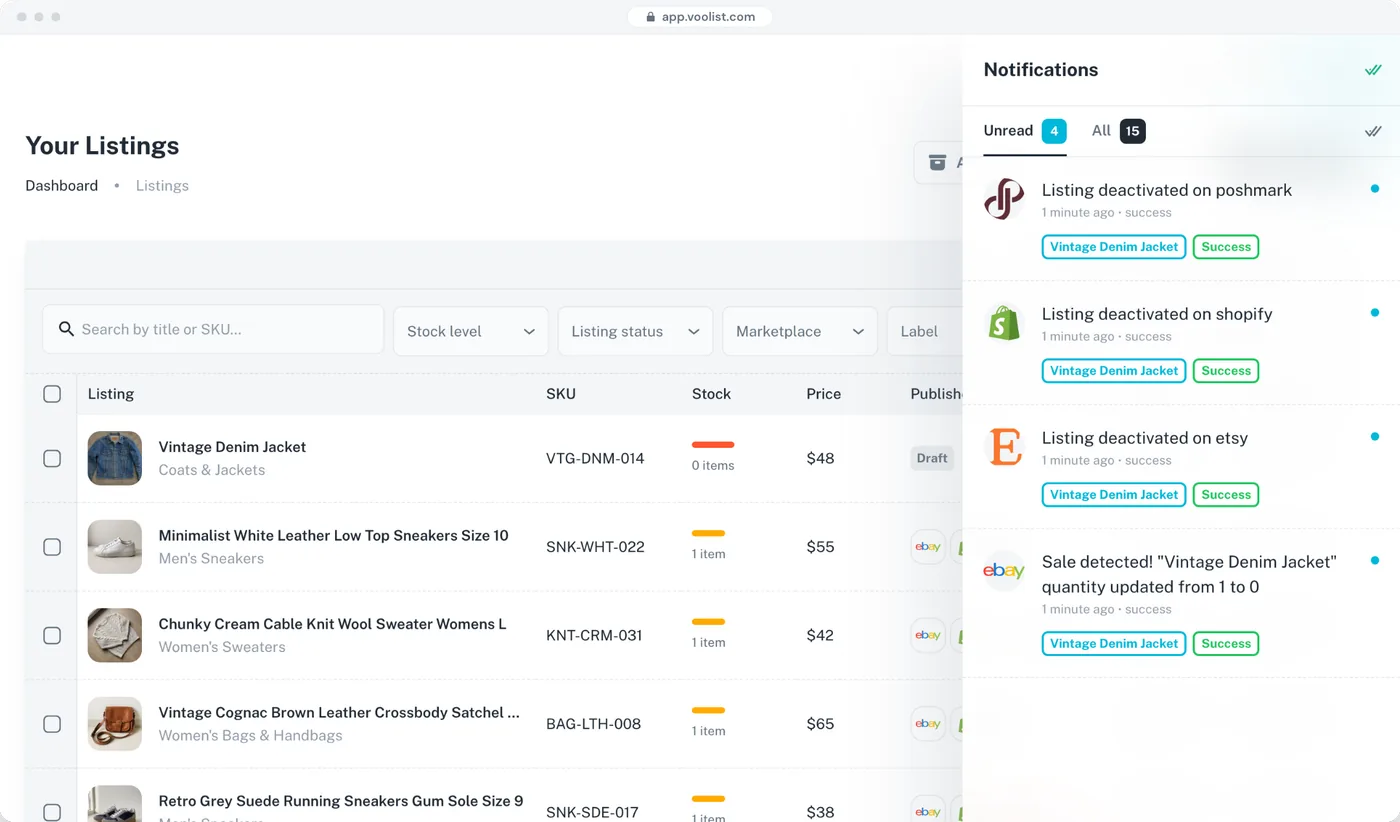
Collectors often want that exact card, and selling it twice means a refund and a disappointed buyer. When something sells on Whatnot, Voolist takes it off your other platforms. When it sells somewhere else, Whatnot follows.
- A Whatnot sale takes the item off your other platforms
- A sale anywhere else lowers or hides it on Whatnot
- Sold it in person? Mark it sold once and every platform updates
- Sales detection and auto-delist are on every plan
Everything runs in the background, even with your laptop closed. On platforms that connect through our Chrome extension, updates go out as soon as you open your browser.
Titles Written for You, One Card at a Time
A listing for a graded card or a sealed box needs the set, the year, the condition and the details collectors search for. Voolist drafts the title and description from your photos and details, and anything you write again and again can live in a template.
- Title and description drafted from your photos and details
- Edit anything before it goes out
- Save the lines you repeat as a template
- Unlimited templates on every plan
Reprice Your Whole Whatnot Shop in One Action
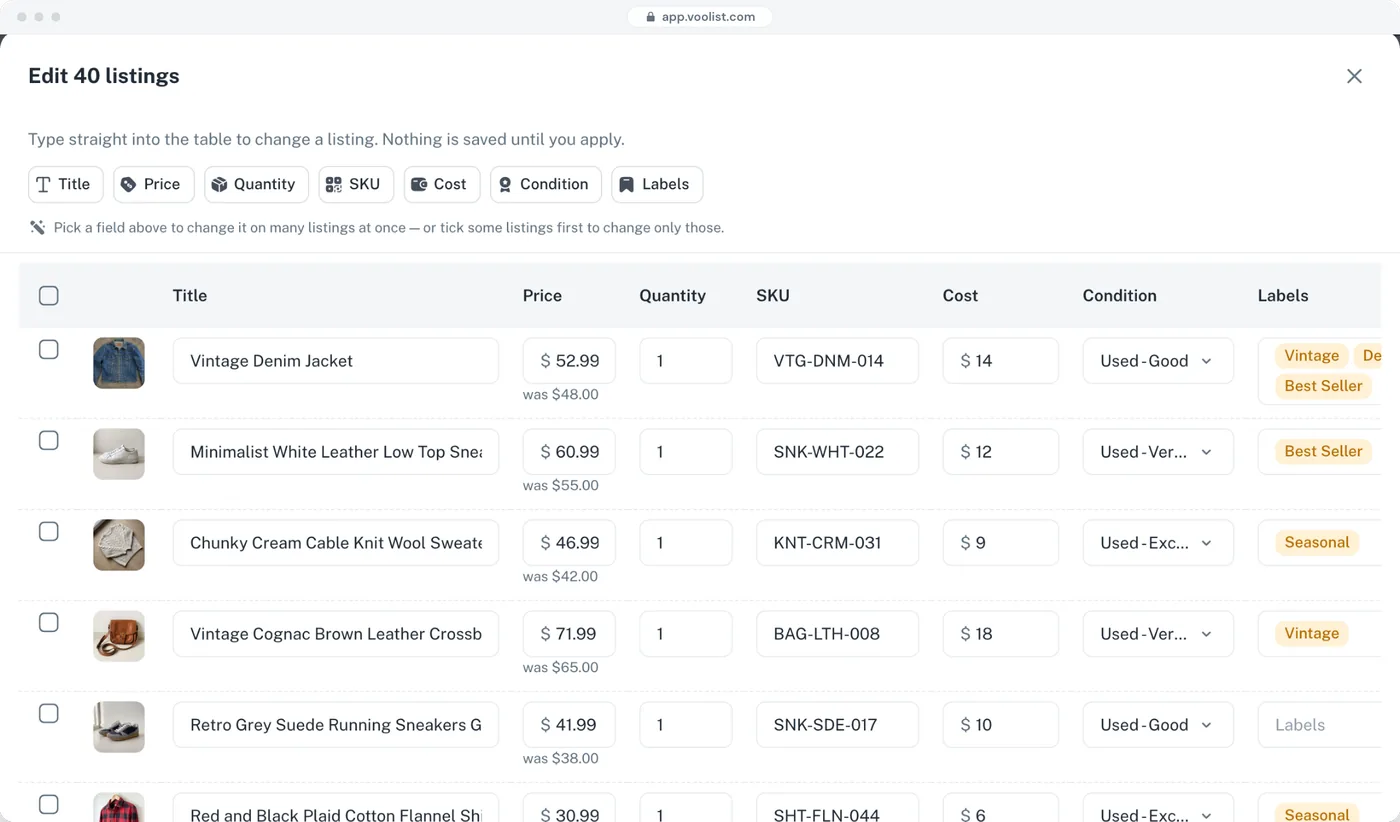
Market prices move, and a shop full of old prices sells slowly or too cheap. Filter down to exactly the listings you mean, set the change once, and watch it apply. Prices on Whatnot can go up as well as down.
- Bulk edit prices, titles, descriptions and tags
- Filter by status, tag, SKU, platform, or date first
- Bulk delist and relist
- Watch each listing complete instead of guessing
Take It Out of Your Shop Without Losing It
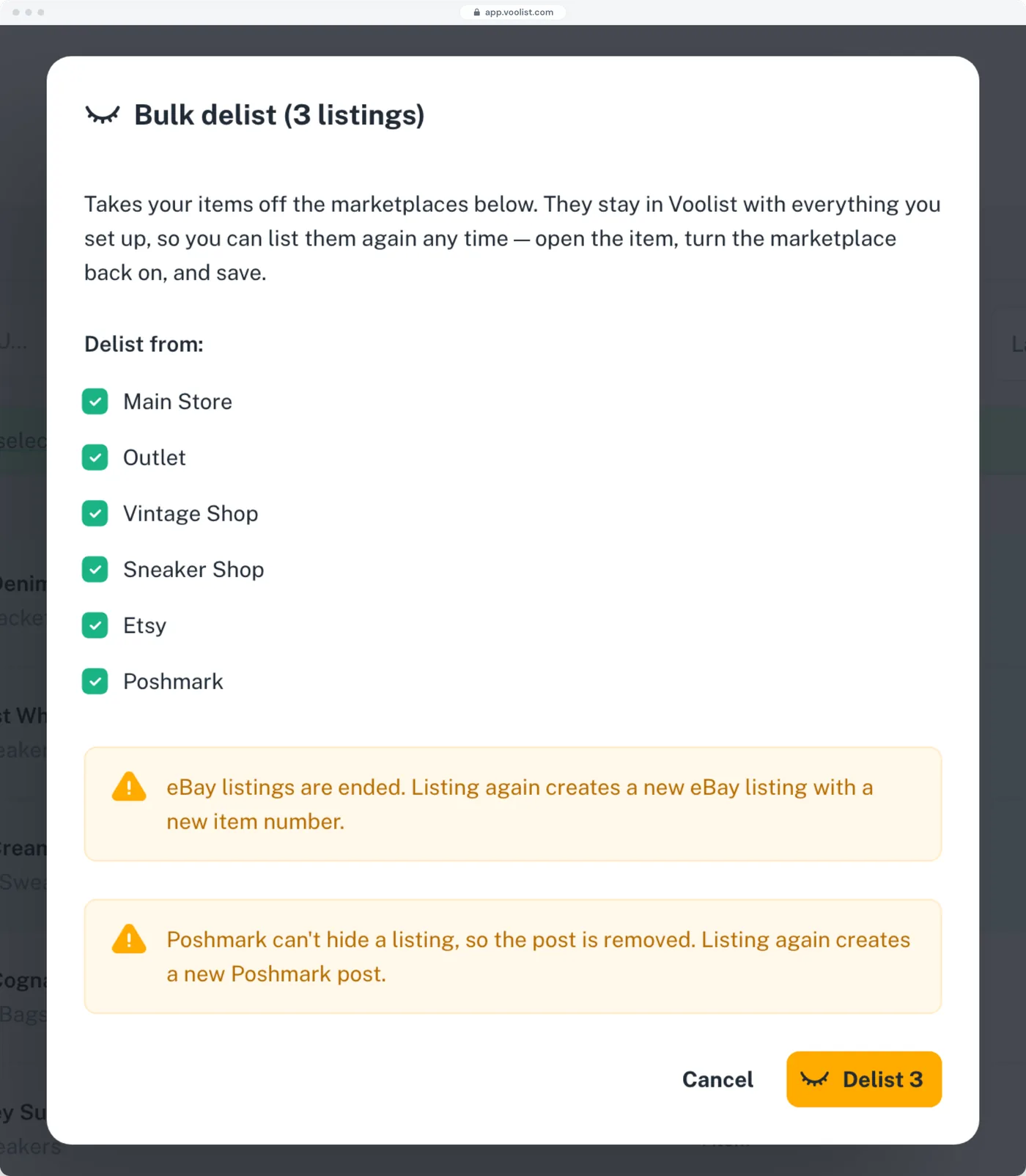
Pull an item from your Whatnot shop and Voolist hides it there instead of deleting it, so it stays in your Whatnot inventory. Everything you build also stays in your Voolist account, with its photos and details, ready to list again.
- Delisting hides it on Whatnot and keeps it in your Whatnot inventory
- Photos and details stay attached to it in Voolist
- Relist or clone anything you’ve built, whenever you want
Getting set up
Connected to Whatnot in a Few Minutes
- Create your accountSign up at Voolist and pick a plan. Whatnot is included in every one of them.
- Connect Whatnot on your computerAdd the free Voolist Chrome extension. Then open Stores in Voolist and hit Connect on Whatnot.
- Import what you already haveVoolist pulls in your active listings and drafts with their photos. Your live listings stay exactly as they are.
Plus the Small Things You Touch Every Day
None of these are add-ons you pay extra for. They’re on every plan.
Import from Whatnot
Bring in your active listings and drafts with their photos.
Import by CSV
Upload your whole inventory from a spreadsheet instead of typing it in.
Smart duplicate detection
Importing from a second platform? Voolist spots the repeats and lets you merge them.
Clone any listing
Got the same card in three grades? Build one and clone it.
Photo editor built in
Crop, straighten, filter and watermark without opening another app.
Free photo hosting
We host your product photos. No extra account and no storage bill.
Smart defaults that learn
Voolist remembers your recent categories and preferences and fills them in.
Search and filter your inventory
Find any item by SKU, tag, or keyword. Filter by platform, status, or date.
Mark as sold anywhere
Sold it in person? Mark it once and your stock updates everywhere else.
Tags and labels
Organize your inventory the way you actually think about it.
Your shop settings
Set your currency, units, and defaults once and stop thinking about them.
Live chat support
A real person to talk to, on every plan.
Sound familiar?
The Parts of Running a Whatnot Shop That Slow You Down
If you’ve said any of these out loud this month, keep reading.
My Whatnot shop is empty unless I’m live.
Fill it with listings you already have elsewhere, sent over together.
Everything I list on eBay, I type again for Whatnot.
Fill in one form and switch Whatnot on. The same listing goes to your Whatnot shop and anywhere else you pick.
I sold a card on eBay that was still in my Whatnot shop.
When it sells anywhere, Voolist takes it off your other platforms, Whatnot included.
I’ve got 20 of the same booster box and the counts never match.
Keep one stock count in Voolist. When some sell elsewhere, the Whatnot count comes down with it.
Changing prices across my shop takes a whole evening.
Filter down to the listings you mean, set the change once, and apply it in one go. Up or down.
Writing titles for hundreds of cards is mind-numbing.
Voolist drafts the title and description from your photos and details. Edit anything before it goes out.
How it compares
Whatnot on Its Own, or With Voolist
Listing one card on Whatnot is easy. Keeping the same stock right everywhere else you sell it is where the hours go.
| Feature | Every feature, every planVoolist | By hand on Whatnot |
|---|---|---|
| Send listings you already have to Whatnot in one go | Yes | Limited |
| One listing for Whatnot and ten more platforms | Yes | No |
| One stock count across every platform | Yes | No |
| Sold item taken off your other platforms | Yes | No |
| Change prices on many listings at once | Yes | Limited |
| Category suggested from your other listings | Yes | No |
| Photo editing built in | Yes | Limited |
| Works without a computer | No | Yes |
| Get Started Now |
- Yes
- Limited
- No
Whatnot connects through the free Voolist Chrome extension, so you set it up on a computer with Chrome.
From sellers using it
What Resellers Say About Voolist
I looooooooove how user-friendly it is. Other cross-listing platforms look like they're made with 1990 html-like design, but Voolist looks minimalist, modern, and easy to use. No clutter or mess. Just straight to the point. You create a listing, you cross-list it, and monitor it.
Full-Time Reseller
Voolist has honestly saved me so much time every week. What used to take hours now just takes a few clicks. The support team is also incredible, every time I've had a question, they've responded quickly and really made me feel valued.
Full-Time Reseller
Voolist is a godsend, thank you. I'm not just saying this, but Voolist has provided me a much needed tool that is very costly most places.
Full-Time Reseller
Voolist helped me increase sales. I was selling only on my Shopify store before, but once I started listing my products on eBay and other platforms, I saw more orders coming in. It is very simple to use and made a huge difference for my business.
Small Business Owner
I spent roughly 5 minutes on Voolist and what a piece of cake! I'm so far thrilled. I cannot begin to tell you how much I love it.
Reseller
I do like how simple it is to build listings here, and how easy everything looks, and I'm impressed with the communication. You folks have built a wonderful product.
Full-Time eBay Seller
I looooooooove how user-friendly it is. Other cross-listing platforms look like they're made with 1990 html-like design, but Voolist looks minimalist, modern, and easy to use. No clutter or mess. Just straight to the point. You create a listing, you cross-list it, and monitor it.
Full-Time Reseller
Voolist has honestly saved me so much time every week. What used to take hours now just takes a few clicks. The support team is also incredible, every time I've had a question, they've responded quickly and really made me feel valued.
Full-Time Reseller
Voolist is a godsend, thank you. I'm not just saying this, but Voolist has provided me a much needed tool that is very costly most places.
Full-Time Reseller
Voolist helped me increase sales. I was selling only on my Shopify store before, but once I started listing my products on eBay and other platforms, I saw more orders coming in. It is very simple to use and made a huge difference for my business.
Small Business Owner
I spent roughly 5 minutes on Voolist and what a piece of cake! I'm so far thrilled. I cannot begin to tell you how much I love it.
Reseller
I do like how simple it is to build listings here, and how easy everything looks, and I'm impressed with the communication. You folks have built a wonderful product.
Full-Time eBay Seller
I looooooooove how user-friendly it is. Other cross-listing platforms look like they're made with 1990 html-like design, but Voolist looks minimalist, modern, and easy to use. No clutter or mess. Just straight to the point. You create a listing, you cross-list it, and monitor it.
Full-Time Reseller
Voolist has honestly saved me so much time every week. What used to take hours now just takes a few clicks. The support team is also incredible, every time I've had a question, they've responded quickly and really made me feel valued.
Full-Time Reseller
Voolist is a godsend, thank you. I'm not just saying this, but Voolist has provided me a much needed tool that is very costly most places.
Full-Time Reseller
Voolist helped me increase sales. I was selling only on my Shopify store before, but once I started listing my products on eBay and other platforms, I saw more orders coming in. It is very simple to use and made a huge difference for my business.
Small Business Owner
I spent roughly 5 minutes on Voolist and what a piece of cake! I'm so far thrilled. I cannot begin to tell you how much I love it.
Reseller
I do like how simple it is to build listings here, and how easy everything looks, and I'm impressed with the communication. You folks have built a wonderful product.
Full-Time eBay Seller
I looooooooove how user-friendly it is. Other cross-listing platforms look like they're made with 1990 html-like design, but Voolist looks minimalist, modern, and easy to use. No clutter or mess. Just straight to the point. You create a listing, you cross-list it, and monitor it.
Full-Time Reseller
Voolist has honestly saved me so much time every week. What used to take hours now just takes a few clicks. The support team is also incredible, every time I've had a question, they've responded quickly and really made me feel valued.
Full-Time Reseller
Voolist is a godsend, thank you. I'm not just saying this, but Voolist has provided me a much needed tool that is very costly most places.
Full-Time Reseller
Voolist helped me increase sales. I was selling only on my Shopify store before, but once I started listing my products on eBay and other platforms, I saw more orders coming in. It is very simple to use and made a huge difference for my business.
Small Business Owner
I spent roughly 5 minutes on Voolist and what a piece of cake! I'm so far thrilled. I cannot begin to tell you how much I love it.
Reseller
I do like how simple it is to build listings here, and how easy everything looks, and I'm impressed with the communication. You folks have built a wonderful product.
Full-Time eBay Seller
Starter
The essentials to sell on every platform
Billed monthly
14-day money-back guarantee
1,000
25
1
Every feature, including:
Cross-list to 11 platforms from one form
Sales detection and auto-delist
Bulk cross-listing
One-click import or CSV upload
AI listing writer
Bulk edit, delist and relist
Live chat support
Pro
For growing sellers who need speed and automation
Billed monthly
14-day money-back guarantee
5,000
250
2
Everything in Starter, plus:
Two eBay accounts or two Shopify stores
3x the active listings
5x the drafts
10x the AI listings
Power
For high-volume sellers and agencies managing large catalogs
Billed monthly
14-day money-back guarantee
10,000
500
2
Everything in Pro, plus:
Priority sync
Priority support
Room for 2,000 to 10,000+ listings
Up to 1,000 AI listings a month
Try Voolist for 14 days
Not happy? Get a full refund, no questions asked.
Secure checkout
Cancel your plan anytime.
What Whatnot Sellers Ask
In one click. With the free Voolist Chrome extension installed on your computer, open Stores in Voolist and click Connect on Whatnot. If you’re signed out of Whatnot, sign in when it asks.
Yes. Your Whatnot account has to be set up for selling before Voolist can list for you. Once it is, connect it and your listings can go up.
Yes. Import your listings from eBay, Shopify or anywhere else you sell, select the ones you want, choose Whatnot, and publish them together. Bulk cross-listing is on every plan.
Yes. Voolist pulls in your listings that are for sale on the Marketplace, and your drafts, with their photos and details. Each one keeps its quantity, SKU, cost, barcode and shipping profile. Importing doesn’t change anything on Whatnot, and once they’re in, you can publish them to ten more platforms.
Yes. Set the quantity in Voolist and your Whatnot listing carries it. When some sell elsewhere, Voolist lowers the count on Whatnot, and when the last one goes, it hides the listing. Voolist never raises the Whatnot count by itself: add stock in Voolist and save, and Whatnot gets the new number. If the listing was hidden at 0, switch Whatnot back on in the listing and save to put it back on sale.
Voolist takes it off your other platforms, or lowers the count there if you have more, so the same item can’t sell twice. Sales detection and auto-delist are on every plan.
Voolist lowers the count on Whatnot, or hides the listing when the last one has gone. A hidden listing stays in your Whatnot inventory. Everything runs in the background, even with your laptop closed. On platforms that connect through our Chrome extension, updates go out as soon as you open your browser.
Yes, up or down. Change the price, title or description in Voolist and save, and the Whatnot listing follows. We recommend making your edits in Voolist, so one place is always right.
No. Whatnot is on every plan, with nothing to add on. Plans differ in how many listings you can have, not in which platforms you can use.
There’s no free trial, but every plan comes with a 14-day money-back guarantee. Try the full product and if it’s not for you within 14 days, you get a full refund. You can cancel anytime.
Still have questions?
Drop us an email at hello@voolist.com
Whatnot basics
Newer to Selling on Whatnot?
Short answers here, and the full guide behind each one.
Selling on Whatnot, the short version
Whatnot is best known for live selling, and its shop keeps selling while you’re offline. Clear photos, honest condition and fair prices do most of the work there.
How to sell on WhatnotWhat Whatnot charges you
Whatnot takes a commission on each sale plus a payment processing fee on the order. Work both out before you set a price, especially on lower-priced cards.
Whatnot fees explainedGetting started with live selling
If you’re thinking about selling on camera, the setup is simpler than it looks: good light, a steady phone and a plan for what you’ll show first.
How to start live sellingAlso Selling Somewhere Else?
Voolist connects to ten more platforms. The same listings work on all of them.
Keep Your Whatnot Shop Stocked
Connect Whatnot, import what you already have, and fill your shop from the listings you’ve already built. 14-day money-back guarantee on every plan.
Get Started Now14-day money-back guarantee